How Slyth Free works
From your code to a faster Windows. Every step, with pictures.
Before you start
- Windows 11 (64-bit), signed in as an administrator, connected to the internet.
- Slyth Free is made for desktop gaming PCs. Laptops are not the target: on a laptop you use it at your own risk (keep it plugged in).
- Plan about half an hour: the PC restarts more than once.
- Close your games and launchers and save open work. Back up files you care about.
- A Discord account that is at least 30 days old and a member of the Slyth Discord.
Slyth Free removes Windows Defender and turns Windows Update and System Restore off. Microsoft Edge and its WebView2 runtime are removed (Brave replaces Edge); the Microsoft Store stays.
Get your code
Sign in with Discord on the start page and press Get my code. You get one code per Discord account. It works on one PC: the first PC you use it on.
Press Copy. You can come back to the start page any time to see your code again.
Download Slyth Free
Press Download Slyth Free next to your code (or get it in the Slyth Discord). The file is SlythFree.exe. It needs nothing else: no installer, no .NET.
If Windows shows a warning
New programs that Windows does not know yet get a blue warning the first time. This is how to start Slyth Free:
- Click More info.
- Click Run anyway.
- Windows asks if the app may make changes: click Yes. Slyth Free needs administrator rights to change Windows settings.
Enter your code and install
Paste your code (Ctrl + V) and press Continue. Slyth Free first checks the PC (battery, pending Windows restart, other antivirus), so your code is never used on a PC where the install would fail.
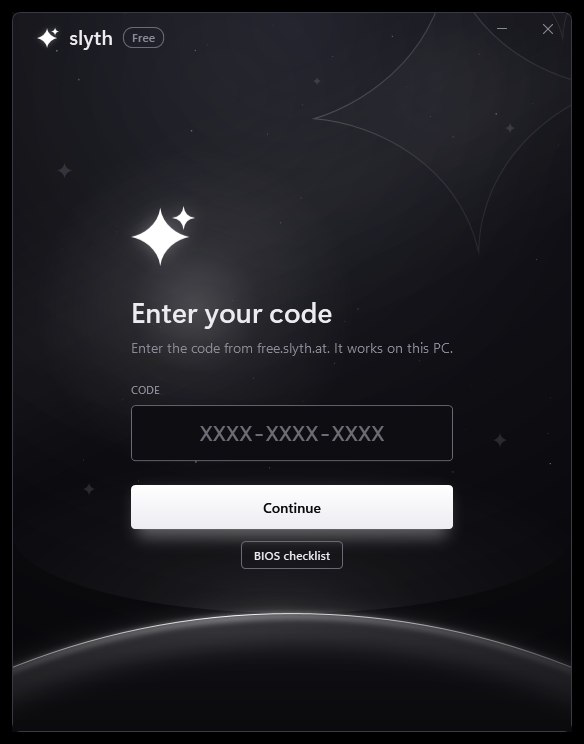
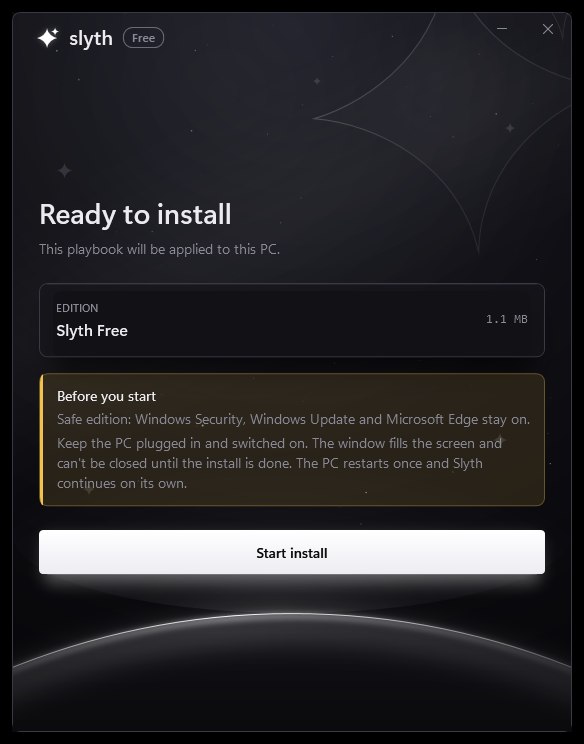
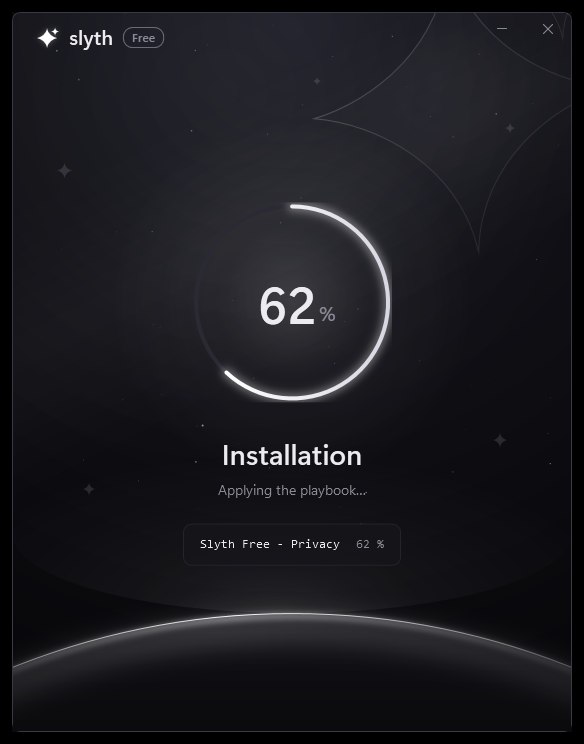
Press Start install. The window fills the screen until it is done. The PC restarts on its own (first to remove Defender, at the end to finish) and Slyth Free continues by itself after you sign in. Do not switch the PC off.
What is different afterwards
- Gaming: the Slyth power plan, GPU scheduling on, no mouse acceleration, Game Mode and Game Bar off, and your game sound no longer drops during Discord calls.
- Performance: Windows Defender removed, Windows Update off, Windows Search indexing off, and tuned CPU, memory, network and power settings.
- Cleaner: extra apps like Clipchamp, News, Weather, Solitaire, Teams, the new Outlook and Phone Link are gone, OneDrive is removed, no ads or tips in Start and Settings, the classic right-click menu.
- Privacy: telemetry and the advertising ID are off, Copilot and Recall are off.
- Look: the Slyth night-sky wallpaper and lock screen, dark mode, the Open-Shell start menu in black, the taskbar on the left with only File Explorer and Brave pinned, and an Explorer that opens This PC.
- Apps: 7-Zip and the Brave browser are installed (Brave is not made your default browser; Microsoft Edge is removed).
- Shutdown: Fast Startup and hibernation are off, so every start is a fresh one.
Undo a change
There is no restore point, because Slyth Free turns System Restore off.
- Single things: most changes are normal Windows settings you can change back (Settings > System, Gaming, Privacy & security, Personalization). Removed apps can be installed again from the Microsoft Store.
- Windows Defender is removed completely and does not come back by itself. To get everything back, reinstall Windows.
BIOS checklist: the biggest extra gain
Some of the largest FPS gains are not in Windows but in the BIOS: the memory profile (EXPO / XMP) and Resizable BAR. Slyth Free has a checklist for that: on the code screen click BIOS checklist, or open it at the end of the install.
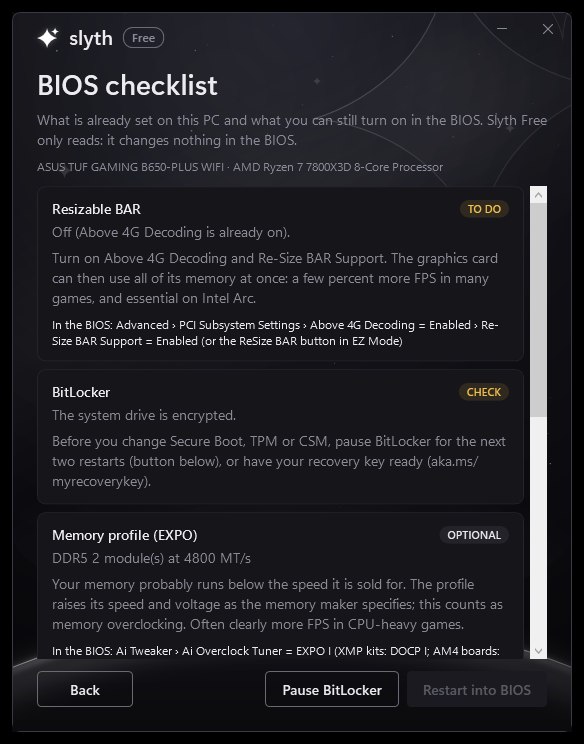
- It only reads your PC and shows what is set, what is missing and where it is in your board's BIOS. It changes nothing in the BIOS itself.
- Restart into BIOS takes you there directly. Otherwise press Del (or F2) right after switching the PC on.
- If BitLocker is on, press Pause BitLocker first, or Windows asks for the recovery key after you change Secure Boot, TPM or CSM.
- The memory profile is optional: after turning it on, the first start can show a black screen for 1-5 minutes while the memory trains. Wait. If the PC does not start, reset the BIOS (Clear CMOS, see your board manual).
Help
Questions or a problem? Ask in the Slyth Discord. A code used on another PC can be reset there. Want even more? The full Slyth is at slyth.at.